Pinterest Workflow for Etsy Sellers: Check Your Pin Before You Publish
You’ve spent an hour on your listing photos. The title is tuned, the description is done, the tags are in. Then you open Pinterest and the Pin gets about ninety seconds of attention. You paste in the Etsy title, paste the listing description, pick whichever board shows up first in the dropdown, and publish. Next product.
I get it. When you’re listing a batch of items, Pinterest feels like the afterthought. But a Pin is its own little page that people judge in a second, and it’s worth a quick look before it goes live.
Pinello is a free Chrome extension that scores Pinterest pins across 5 dimensions — image, board fit, title, description, and hashtags — in real time. Below is the routine I’d use with it, step by step. The same order works with a plain checklist too, so you can use it either way.
What you’ll see in the examples
The screenshots in this post come from a real Create Pin draft for an Etsy-themed Pin: a “How to Sell on Etsy for Beginners” guide graphic, posted to a board called Etsy Ideas. That’s the kind of Pin an Etsy seller might make to share tips or send people to a blog post.
If you pin products, the checks are the same: image, title, description, topics, board. I’ll point out where product Pins differ as we go. I’m not showing a product Pin here because I’d rather show you a real draft than make one up.
Start with the image
Look at the image first, because that’s what people judge first.
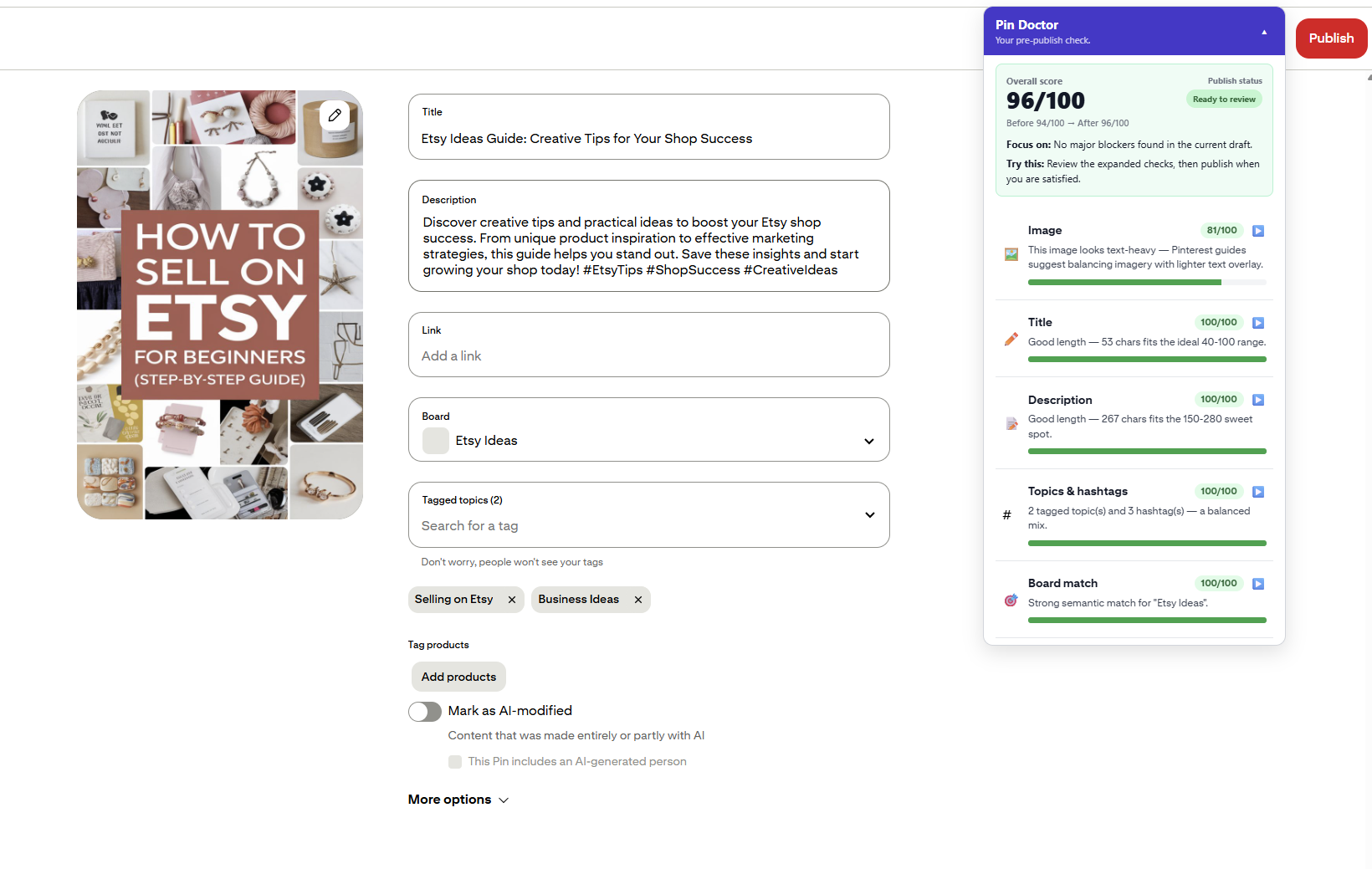
In this draft, Pin Doctor scores the image 81 out of 100 and says it looks text-heavy, with a hint to balance the picture with lighter text. Everything else on the panel is 100. So if I were publishing this Pin, the image is the only thing I’d think about changing.
That’s the useful part. You don’t get a wall of warnings. You see which one area is the weakest and you fix that.
For a product Pin, ask yourself a few plain questions:
- Can you tell what the product is at thumbnail size?
- Is there one clear focal point?
- If there’s text on the image, can you read it on a phone?
- Does it match what’s really in your listing?
Skip big claims on the graphic that your listing can’t back up. “Hand-painted ceramic mug” is honest. “The perfect gift for everyone” isn’t.
Write a title that says what it is
Your Etsy title and your Pinterest title don’t have to match. Etsy titles are often long strings of search terms. A Pin title reads better when it sounds like something a person would stop on.
The title in our example is “Etsy Ideas Guide: Creative Tips for Your Shop Success.” That’s 53 characters, and Pin Doctor says it falls in its 40 to 100 character range for a good length. It also leads with the subject.
For a product, the same idea applies. Put what the thing is up front. “Hand-painted blue ceramic coffee mug” tells someone more than “A little something special for you.”
If you’re stuck, Pin Doctor has a button that suggests another version. It copies the text to your clipboard, and you paste it in yourself if you like it. It never types into Pinterest for you, and it reminds you to review the suggestion before you use it.
Add a description with some substance
The description in this draft is 267 characters, which sits in Pin Doctor’s 150 to 280 range. That’s a few sentences. It says who the guide is for and what they’ll get, and it ends with a couple of hashtags.
Don’t paste in your whole Etsy listing description. A couple of natural sentences work better. For a product, try to answer three things: what is it, who’s it for, and why would they care?
And don’t claim things your product can’t back up. If the mug isn’t dishwasher safe, don’t hint that it is.
One thing worth noticing in the screenshot: the Link field is still empty. For a product Pin, that’s where shoppers go next, so don’t forget it. I’m pointing it out because it’s easy to miss when you’re moving fast.
Check topics and hashtags
This Pin has two tagged topics, Selling on Etsy and Business Ideas, plus three hashtags in the description. Pin Doctor calls that “a balanced mix” and gives it 100.
Pinterest’s own note on the form says people won’t see your tagged topics. They’re there to help Pinterest understand the Pin. Hashtags in the description, on the other hand, are visible.
Keep both focused on the actual Pin. A few specific tags are better than a long list of broad ones like #love or #shop. If your mug Pin has hashtags about wedding décor, that’s a mismatch, even if you sell wedding items elsewhere in your shop.
Pick the board on purpose
Board choice is easy to rush, so slow down for a second.
The Pin in our example goes to a board called Etsy Ideas. Pin Doctor’s board check says “Strong semantic match” and scores it 100.
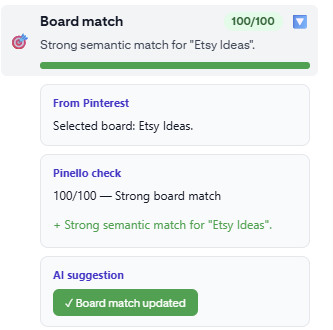
Notice how the panel separates two things. “From Pinterest” shows the board you picked. “Pinello check” is Pinello’s own opinion. That’s handy, because you can see which part came from Pinterest and which part is a signal from the tool.
For your own shop, think about what someone would expect to find on that board. A mug Pin belongs on “Coffee Lover Gifts” or “Handmade Ceramics.” It doesn’t belong on a board full of printable wedding templates, even if you sell both.
Read the overall result
At the top of the panel, this draft shows 96 out of 100 with a “Ready to review” status. The note underneath says no major blockers were found and suggests reviewing the expanded checks before you publish.
I like that wording. It doesn’t say “go ahead, this will do great.” It says: here’s what we checked, now it’s your call.
That’s how I’d treat the score. It’s a quick way to catch the weak spot, not a verdict on how your Pin will do on Pinterest. It’s Pinello’s own signal, not an official Pinterest score, and it can’t promise saves, clicks or sales.
If you pin blog posts instead of products
Plenty of Etsy sellers also write: a how-to for their craft, a gift guide, a behind-the-scenes post. The Pin in our example is that kind of Pin. The routine is the same, but a couple of things shift.
The image matters even more, because a guide Pin often has text on it, and that’s exactly what got flagged here. The title should promise the useful thing inside the post. And the board should be one a reader would actually browse. A tip Pin on a board called “Etsy Ideas” makes sense. The same Pin on a board of finished products is a bit odd.
The routine, start to finish
For each new Pin:
- Open Create Pin and add your image.
- Check the image result and fix it if it’s flagged.
- Write a clear title that says what the thing is.
- Add a short, honest description, and add the link.
- Add a few topics and hashtags that fit.
- Choose the board that matches.
- Open Pin Doctor and look at the weakest check.
- Fix that one thing, then check again.
- Read it over yourself, then click Publish in Pinterest.
That’s about two minutes once you’ve done it a few times. If you’re listing several products in one sitting, it’s a nice way to catch the careless slip before it goes out.
Common slip-ups on Etsy Pins
A few mistakes come up again and again:
- Using the Etsy title word for word. It’s usually built for Etsy search and reads oddly as a Pin.
- A product that gets lost in the photo. A small item on a plain background can disappear in a busy feed.
- Boards named after your shop. “My Shop Favorites” tells nobody anything. “Coffee Lover Gifts” does.
- Copying one description across several products. It’s the fastest way to end up with copy that doesn’t match the image.
None of these are hard to fix. They’re just easy to miss when you’re moving fast.
What a Pin check can’t do
It’s worth being clear about this. A check like this can help you publish a cleaner Pin. It can’t promise Etsy visits, sales, saves or ranking. Those depend on your audience, your product, the season, how much competition there is, and Pinterest’s own systems.
Pinello also only sees what’s on the page at that moment. If a check shows as unavailable or partial, that’s the tool being honest about what it can verify. In that case, check the field yourself and carry on.
After you publish, look at your own results in Pinterest and in your shop. That’s where you find out what actually worked.
Try it on your next Pin
If you list products regularly, the next Pin is a good one to try this on. Pinello is free to install, it sits beside the Create Pin form, and it never publishes anything for you. You stay in charge of what goes live.
Start with one Pin. See whether the check catches something you’d have missed. If it does, you’ve got a useful habit. If it doesn’t, you’ve lost about two minutes.