Pinterest Pin Scorer: Feed Score vs Pin Detail Score vs Pin Doctor
Pinterest Pin Scorer: Feed Score vs Pin Detail Score vs Pin Doctor
A Pinterest Pin can look different depending on where you inspect it. In the feed, you see a compact card. In the closeup, you can review more of the Pin’s details. In Create Pin, you are working on a draft that you can still change.
Pinello is a free Chrome extension that scores Pinterest pins across 5 dimensions — image, board fit, title, description, and hashtags — in real time. It places three related surfaces around those three moments: Feed Score while you browse, Pin Detail Score when you open a Pin, and Pin Doctor while you prepare your own Pin.
These surfaces belong to one workflow, but they are not interchangeable. Each one answers a different question: Which Pins are worth a closer look? What can I learn from this Pin’s fuller context? What should I fix in my own draft before publishing?
The short version
| Pinello surface | Where you see it | What it is for |
|---|---|---|
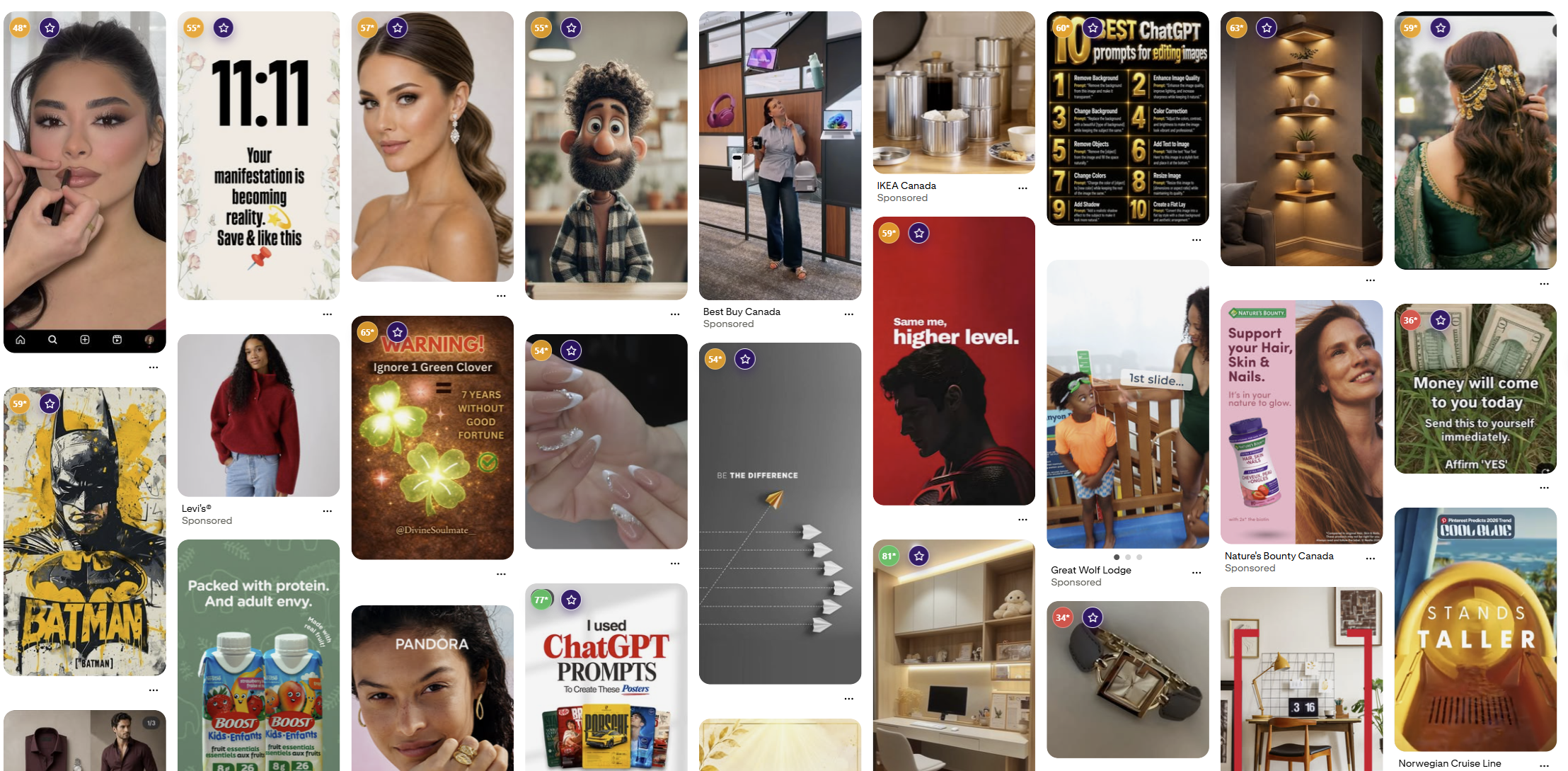
| Feed Score | Pinterest feed cards | A quick signal while you browse |
| Pin Detail Score | The Pin closeup | A fuller inspection using the information available there |
| Pin Doctor | Pinterest Create Pin | Pre-publish checks and guidance on the next fix |
The numbers can differ because the surfaces have different inputs. That is not a bug, and it is not a promise that one number is the “real Pinterest score.” These are Pinello’s own quality-review signals based on the information available at that moment.
1. Feed Score: a quick signal while you browse
Feed Score is designed for speed. As you browse Pinterest, Pinello adds score badges to feed cards so you can decide which Pins deserve a closer look.
This is useful when you are:
- Collecting inspiration for a new Etsy listing
- Reviewing Pins in a niche before designing your own
- Looking for examples of title and description patterns
- Comparing several Pins without opening every one
- Saving promising Pins to local Favorites for later
The feed card does not always expose every field available inside the Pin closeup. A Feed Score is therefore a browse-time signal, not a complete inspection.
The surrounding context still matters. Depending on what Pinterest exposes, Pinello can show creator and board context, visible stats, and other details that help you understand what you are looking at. Those details are useful for research, but they should not be treated as an official Pinterest measurement or as an explanation of future distribution.
When to use Feed Score
Use Feed Score when you are moving quickly through a feed and want a compact way to prioritize what to inspect next. You do not need to stop and analyze every Pin. Start with the Pins that are relevant to your topic, then open the ones that contain useful examples or context.
For example, an Etsy seller planning a nursery-art collection might browse several related searches, note which Pins are visually clear, and save a few useful references. Feed Score helps keep that first pass lightweight.
Do not copy another creator’s wording or assume that a score explains why a Pin received attention. Use the feed view to collect examples and questions for your own publishing workflow.
2. Pin Detail Score: inspect the closeup
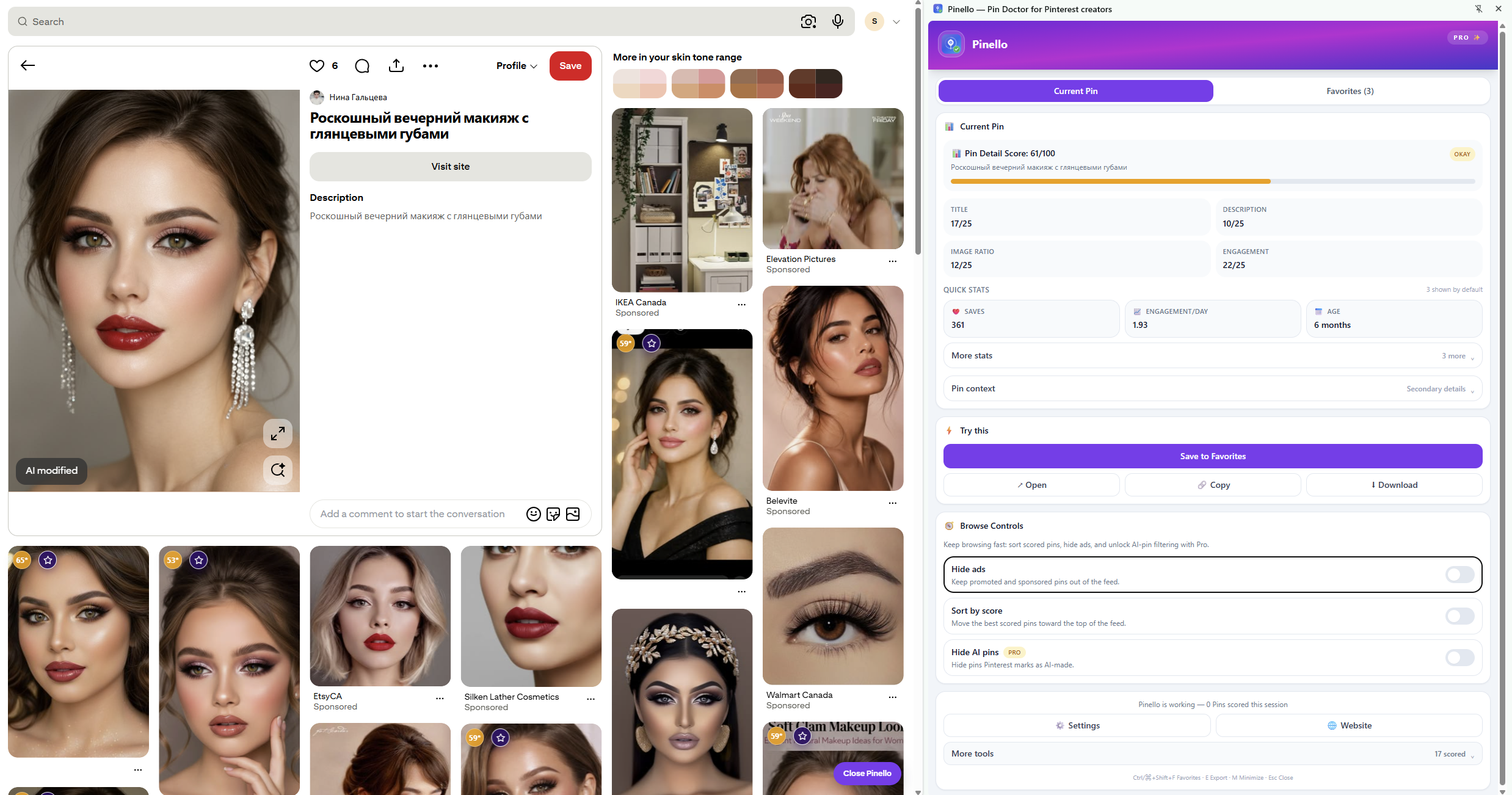
Pin Detail Score appears when you open a Pin. The closeup can expose fuller information than the feed card, such as the title, description, board, image dimensions, creator context, visible stats, and other available Pin metadata.
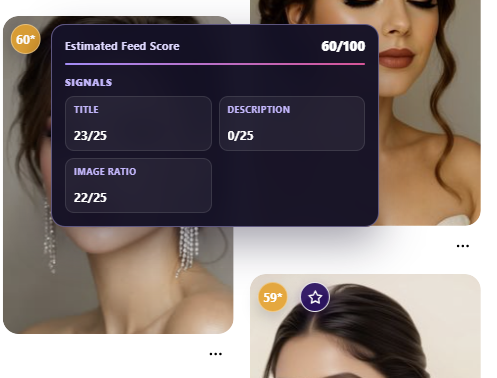
With that fuller view, Pinello can recompute its score using more inputs. A Pin that received a partial Feed Score may receive a different Pin Detail Score simply because more information is now available.
Use the closeup to ask better questions:
- What does the title actually say?
- Does the description add useful context?
- Which board is attached?
- Are the image dimensions and presentation what you expected?
- What creator and board context is visible?
- Which details are supplied by Pinterest, and which are Pinello checks?
You can also save the Pin to local Favorites. Favorites keep useful research in your browser, where you can filter or sort saved Pins by available score and review them later. This creates a reference set without turning a score into a claim about what will happen next.
Why Feed Score and Pin Detail Score may not match
Imagine a feed card with a strong image and a short visible title. Feed Score may use that limited information. When you open the Pin, the closeup may reveal a blank description, a different board context, or additional metadata. Pin Detail Score can account for the fuller view.
The reverse can happen too. A field may be unavailable, incomplete, or exposed inconsistently. Pinello shows the score it can calculate from the current evidence and uses source labels where the distinction matters.
The practical interpretation is simple:
- Feed Score is a quick browse-time check.
- Pin Detail Score is a fuller closeup check.
Neither one is an official Pinterest ranking score, and neither one predicts reach, saves, clicks, or future performance.
3. Pin Doctor: improve your own draft
Pin Doctor is the creation-side surface. It appears inside Pinterest’s Create Pin workflow, where you can still edit the image, title, description, topics, and board.
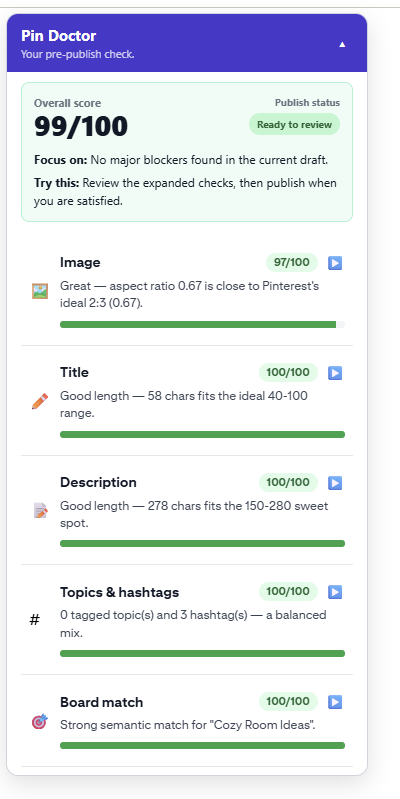
Instead of helping you choose what to inspect, Pin Doctor helps you decide what to fix next. Depending on the available fields and the current draft, it includes:
- Image checks
- Title checks
- Description checks
- Topic and hashtag checks
- Board-related checks
- SEO Audit
- A publish-status chip
- Focus next for the most important issue
- Before-and-after rescore after you revise the draft
The distinction is important. Feed Score and Pin Detail Score help you inspect Pins you are browsing. Pin Doctor is for the Pin you are preparing to publish.
When to use Pin Doctor
Open Pin Doctor after you have chosen the Pin’s direction and are ready to review the draft. Start with SEO Audit and Focus next rather than trying to change everything at once.
If the title is vague, rewrite it so the topic is clearer. If the description is empty, add useful context in natural language. If the selected board does not fit the Pin, review the board choice and run the explicit Board Match check when appropriate.
When you use an AI action, Pinello returns a copy-only suggestion to your clipboard. You choose whether to paste it, edit it, or ignore it. Pinello does not publish the suggestion for you, and the final wording remains your decision.
After making a change, review the draft again. The before-and-after rescore helps you see whether the change improved the checks that were available for that draft.
A practical browse-to-publish workflow
Step 1: Browse with Feed Score
Start on Pinterest and look for Pins relevant to the topic, audience, and format you are researching. Use Feed Score to prioritize which examples deserve more attention. Save useful references to Favorites rather than opening every card immediately.
Step 2: Inspect promising Pins with Pin Detail Score
Open a small set of Pins and compare their closeup details. Look at titles, descriptions, boards, image treatment, and visible creator or board context.
You are building a better brief for your own Pin: what is clear, what is missing, and which decisions seem intentional. Pinello can help you inspect those fields. It does not tell you that another Pin will win or that your version will receive a particular result.
Step 3: Improve your own draft with Pin Doctor
Create your Pin, select the board, and open Pin Doctor. Start with the highest-priority issue, make a focused revision, and review the result again.
This order keeps research and creation separate. You can learn from the context around existing Pins without copying them, then apply the useful lessons to a draft that belongs to you.
Source labels keep the scores understandable
Pinello uses plain labels to distinguish what you are seeing:
- From Pinterest — information exposed by Pinterest
- Pinello check — a local or rule-based review
- AI suggestion — copy generated only after you request an action
- Not provided by Pinterest — information the platform does not expose to Pinello
This distinction is especially useful when reviewing Board Match or a copy suggestion. Those are Pinello tools for decision support, not official Pinterest judgments.
Which surface should you use?
Use Feed Score when you are moving quickly through a feed and want a compact signal.
Use Pin Detail Score when a Pin is worth opening and you want fuller context.
Use Pin Doctor when the Pin belongs to you and you can still edit it before publishing.
You do not need to choose one surface forever. A creator can browse for inspiration, inspect a saved example, and then switch to Pin Doctor for the actual publishing workflow.
What none of these scores means
None of these surfaces predicts reach, virality, ranking, saves, clicks, timing, or future performance. Pinterest’s own systems and user behavior include information outside the fields a browser extension can inspect.
Pinello’s narrower promise is more practical: it makes visible checks easier before you publish. You can improve a vague title because it is vague. You can choose a board because it fits the Pin. You can repair an incomplete description because it leaves out the point. Those are decisions you can make before publishing without pretending to know the future.
Try the full inspect-to-improve workflow
See the Pinello workflow for browsing, inspecting, and improving Pins. The landing page shows where Feed Score, Pin Detail Score, and Pin Doctor fit without asking you to treat any one number as a guarantee.