Pinterest Ad Blocker Extensions Compared (2026): Free vs Paid
Type “pinterest ad blocker” into the Chrome Web Store and you’ll get a page of extensions that all promise the same thing: no more promoted Pins. Look closer and they split into two camps. Some charge a monthly fee for something that should be free. Others are free but do nothing beyond hiding ads.
I went through each of them on 25 November 2026 and wrote down what actually matters: price and what each one hides. Full disclosure, one of them is mine. Pinello is a free Chrome extension that scores Pinterest pins across 5 dimensions — image, board fit, title, description, and hashtags — in real time, and its Hide ads switch is free, with no trial and no subscription. I’ll explain why I think it’s the best pick for most people who use Pinterest seriously, and I’ll be straight about where the others are stronger.
First, why you need an extension at all: Pinterest’s help page says you can hide individual ads and block advertisers, but “you can’t turn off ads completely”. There’s no ad-free plan to buy.
The comparison table
| Extension | Price to hide ads | Hides | Extras |
|---|---|---|---|
| Pinello | Free (no trial, no account) | Promoted and sponsored Pins (Free); AI-labelled Pins (Pro) | Pin scores, Pin stats, Favorites, Pin Doctor pre-publish check |
| Pinterest Ads & Promo Remover | 3-day trial, then $1/month | Ads, promoted, video and shoppable Pins, suggestions, your keywords | Keyword filters |
| Pinterest Without Ads | Free | Ads and promotional content | — |
| Feed Cleaner for Pinterest | Free; Pro $2.99/mo, $19.99/yr or $39 lifetime | Ads, promoted and shopping Pins; AI Pins in Pro | Layout and download options (Pro) |
| Pinterest Ad Blocker | Free | Promoted Pins | — |
Prices come from each Chrome Web Store listing on 25 November 2026.
There’s also a long tail of smaller ad hiders (Clean Pinterest, PinClean, Pinterest Cleaner and others) that do much the same job.
1. Pinello: free ad hiding, plus tools that make Pinterest more useful
Most Pinterest ad blockers do one thing: remove ads. Pinello removes ads and helps you get more out of what’s left. Turn on Hide ads in the side panel and promoted and sponsored Pins drop out of your feed. Everything else on that panel is there to help you judge the Pins you do see.
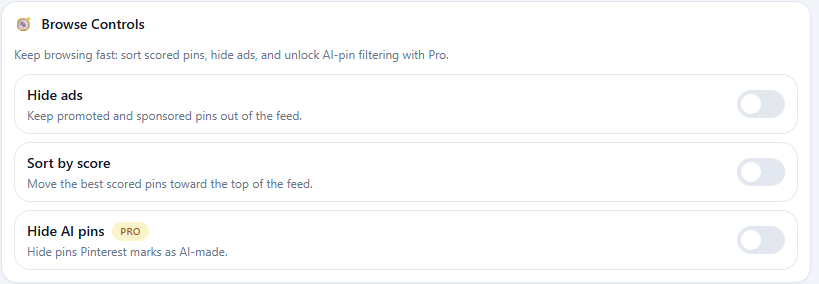
Why I think it’s the strongest option:
- Hiding ads is genuinely free. There’s no 3-day trial that turns into a subscription, no account and no card. The most popular alternative charges $1 a month for the same core job.
- It’s actively maintained. Pinterest ad blockers break when Pinterest changes its page, so they need someone to fix them quickly. Pinello ships regular updates.
- Your feed becomes more useful, not just emptier. Every Pin card gets a Feed Score. Open a Pin and you see its saves, engagement per day, board and a fuller Pin Detail Score. If you save ideas for projects, recipes, products or a business, that tells you which Pins are worth your time.
- It’s built for people who make Pins. If you post on Pinterest (a blog, an Etsy shop, a print-on-demand store), the Pin Doctor checks your draft inside Create Pin before you publish. No other extension in this list does that.
- Private by default. Pinello doesn’t send the Pins you browse anywhere.
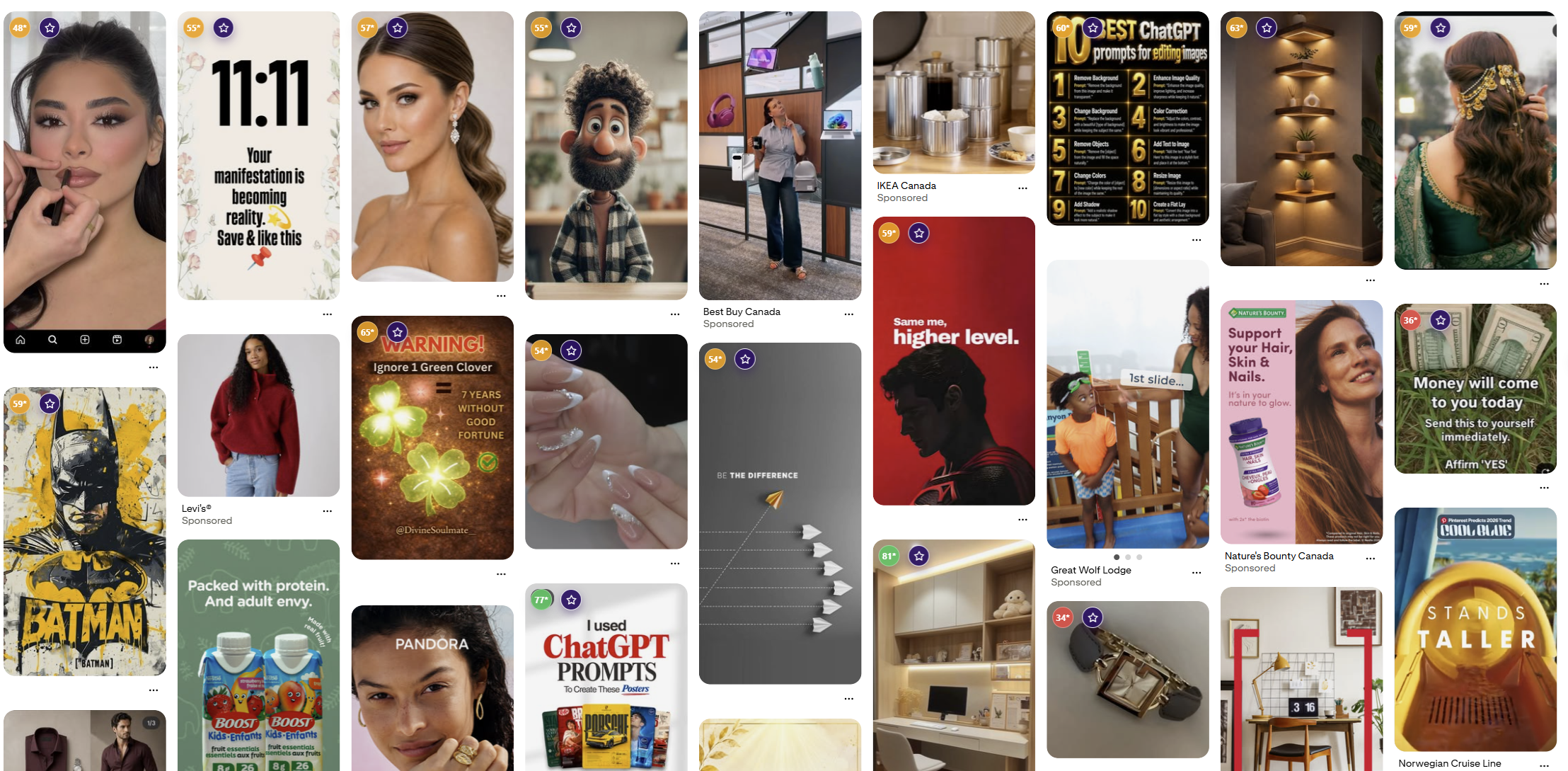
Free vs Pro, clearly:
- Free: Hide ads, Feed Score, Pin Detail Score and stats, local Favorites, 20 Pin Doctor checks and 5 AI actions a month.
- Pro ($8.99/month or $79/year, 7-day free trial): Hide AI pins (hides every Pin carrying Pinterest’s AI label), unlimited Doctor checks, 200 AI actions a month and CSV export.
You never need Pro to hide ads.
Worth knowing: Pinello adds score badges to Pin cards. That’s the point if you care about which Pins perform, and easy to ignore if you don’t.
Best for: anyone who wants Pinterest ads gone for free from an extension that’s actively maintained, and especially anyone who saves, researches or creates Pins.
2. Pinterest Ads & Promo Remover: the popular paid one
This is the one most people find first, with a “Featured” badge in the store. It goes beyond ads: it can also hide video Pins, shoppable Pins and suggestion blocks, and you can add your own keywords to filter out.
The catch: after a 3-day trial it’s $1 a month, every month, for something several extensions do for free.
Best for: people who want lots of extra filters (videos, shopping, keywords) and don’t mind a subscription.
3. Pinterest Without Ads: free and basic
A simple, free extension. It removes ads and promotional content across Pinterest’s regional sites.
The catch: it only hides ads. There are no scores, stats or other tools, so it makes your feed emptier but not more useful.
Best for: people who want the simplest possible free tool.
4. Feed Cleaner for Pinterest: free ad blocking, paid extras
Feed Cleaner blocks ads, promoted Pins and shopping Pins for free, with no account. Pro adds AI-Pin hiding, keyword filters, blocking sites and accounts, HQ downloads and layout tweaks for $2.99 a month, $19.99 a year or $39 once.
The catch: it’s a pure filter. It cleans the feed but doesn’t help you judge or improve the Pins you see.
Best for: people who want lots of visual feed tweaks and nothing else.
5. Pinterest Ad Blocker: the minimal one
Exactly what the name says: a small, free extension (48 KB) that removes promoted Pins as the page loads. There are no settings, and the developer declares it doesn’t collect data.
The catch: it’s a 1.0 with a single job and no extras.
Best for: people who want the lightest tool possible.
How these extensions work (and why maintenance matters)
All five work in a similar way: they recognise Pinterest’s ad labels as you scroll and hide those Pins on your screen. Nothing changes in your Pinterest account.
Two things follow from that:
- They can stop working when Pinterest redesigns. An actively maintained extension gets fixed quickly. An abandoned one quietly stops working.
- They only work on a computer, in Chrome (and usually Edge and Brave too). None of them work in the Pinterest app on iPhone or Android. On mobile, you’re limited to Pinterest’s own Hide Pin and Block options.
What to check before installing any Pinterest extension
Whichever one you choose, spend thirty seconds on its store page first:
- Permissions. A Pinterest ad blocker should only need access to Pinterest. If it asks to “read and change all your data on all websites”, ask yourself why.
- Privacy section. Scroll to Privacy on the listing and check what the developer says it collects. Pinello spells it out there.
- Recent reviews. Sort by newest. “Stopped working” reviews from last month tell you more than a 5-star review from 2024.
- A way to reach the developer. A website or support email means someone is likely to fix it when Pinterest changes.
Do you need to pay to block Pinterest ads?
No. Paying a monthly fee just to hide promoted Pins doesn’t make much sense when free options are maintained and work well. Pinello hides them for free, with no trial clock and no subscription.
Pay only for something beyond ads:
- Hiding AI Pins: Pinello Pro or Feed Cleaner Pro. Pinterest’s own Show AI content setting also reduces them for free.
- Extra filters (videos, shopping, keywords): Pinterest Ads & Promo Remover or Feed Cleaner Pro.
- Pin checks for creators: Pinello Pro’s unlimited Pin Doctor and AI actions.
My pick
Pinello, for most people. Ad hiding is free with no subscription, it’s actively maintained, and it turns your feed into something you can actually judge, with scores and stats on every Pin. If you also post on Pinterest, nothing else on this list helps you before you publish.
Pick something else only if you specifically want video, shopping or keyword filters (Ads & Promo Remover) or a filter-only tool with lots of visual options (Feed Cleaner).
Hide Pinterest ads free with Pinello. It takes a minute to install. Turn on Hide ads, and the promoted Pins are gone.
Pinterest is a trademark of Pinterest, Inc. None of these extensions, including Pinello, are affiliated with Pinterest. Prices and stats can change; check each listing before you install.