How to Read Pinterest Pin Stats Without Guessing What They Mean
A Pin with 2,000 saves looks impressive.
It might be. It might also be three years old, posted by a huge account, or from a topic that had a very different audience back then. The number is real. The conclusion you draw from it might not be.
Pinello is a free Chrome extension that scores Pinterest pins across 5 dimensions — image, board fit, title, description, and hashtags — in real time. It also shows the stats behind any Pin you open, which is what this post is about.
I’ll walk through a real panel, say what each number can and can’t tell you, and give you a calm way to read them so you don’t chase the wrong lesson.
Which stats can you see?
Depending on the Pin and the Pinterest page you’re on, you might see saves, comments, shares, the Pin’s age, and an engagement-per-day figure when there’s enough to work it out.
Pinello shows what it can read in a side panel when you open a Pin.
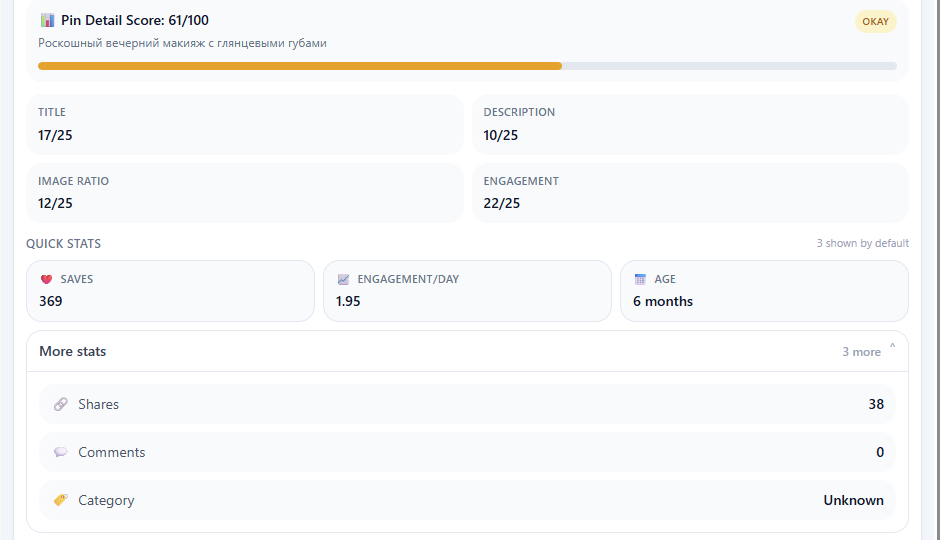
At the top is a Pin Detail Score, here 61 out of 100, labelled “Okay.” Under it are four sub-scores for title, description, image ratio and engagement. Below that are the quick stats (saves, engagement per day, age), and a “More stats” section with shares, comments and category.
Not every Pin shows every stat. Pinterest data can be partial, and fields change from time to time. Look at the Category row in the screenshot. It says Unknown, which means Pinello couldn’t verify it. It doesn’t mean the Pin has no category.
Check the age before the number
Totals reward older Pins. A Pin from last week hasn’t had much time to collect saves. One from three years ago has had plenty. If you compare them as if they started together, you’ll learn the wrong thing.
Age doesn’t make a Pin less useful. It just changes the question. Is this a long-lived reference Pin? Is the topic seasonal? Did it pick up attention slowly? Is there enough context to compare it with a newer Pin?
In the panel above, the age is six months. So 369 saves over six months is a different story than 369 saves over six years. When Pinello shows an age, read that first. When it doesn’t, call the comparison limited instead of guessing.
A save isn’t a click
This sounds obvious, but it gets lost in a lot of Pinterest advice.
A save tells you someone wanted to keep the idea for later. It doesn’t prove they visited the link, bought anything, or even read the description. A comment might be a question or a disagreement. A share might mean it was useful to someone else.
None of these tell you what your own listing or blog post will get. Pinello doesn’t turn stats into sales estimates or reach forecasts. It shows you what Pinterest makes available, so you can look at a Pin with fewer assumptions.
Read the numbers beside the Pin
A number gets more useful when you put it next to the actual Pin. Look at:
- The image. Can you tell what it is at thumbnail size?
- The title. Does it explain the Pin early and plainly?
- The description. Does it add context, or just filler?
- The board. Does it fit the subject?
- The creator. Is it a big account or a small one?
- The destination. Does it seem to lead somewhere relevant?
This is why a Pin Detail view helps more than a count copied into a spreadsheet. A high-save Pin might teach you something about composition, topic framing, board choice, or timing. You need the surrounding details to guess which one is plausible.
Feed Score and Pin Detail Score aren’t the same thing
While you scroll, Pinello can show an estimated Feed Score as a small badge on each Pin. Hover over it and you get the signals behind it.
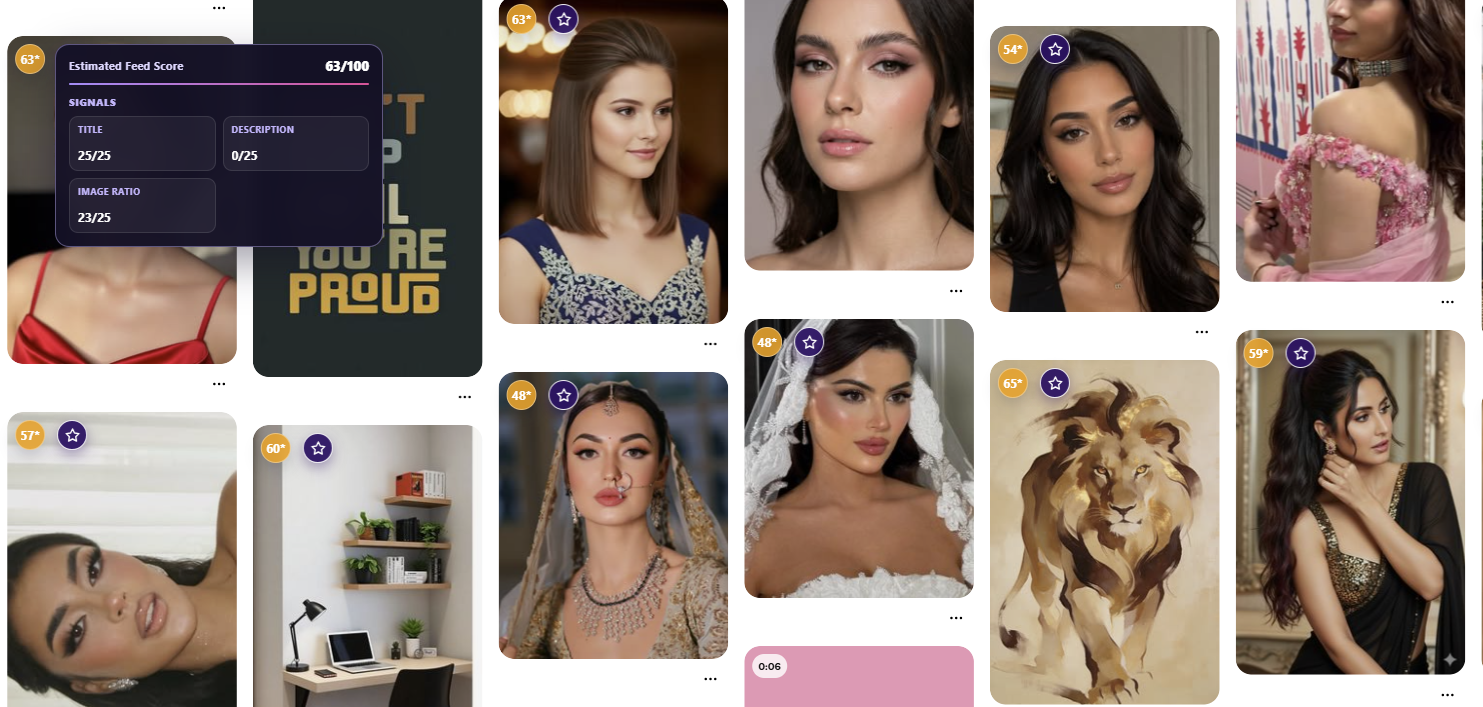
In this capture, the hover card shows a 63 out of 100 estimate based on three signals: title, description and image ratio. It’s a quick comparison built from what’s visible on the feed card.
When you open the Pin, Pinello can build a fuller Pin Detail Score from the closeup data. That includes engagement, which the feed card didn’t show here. So the same Pin can score differently in the two places. That’s expected. More data can give a different signal.
Neither score is Pinterest’s official ranking. Neither one predicts reach, clicks or saves. A higher score means the Pin matches more of Pinello’s checks, based on what it can see. That’s all it means.
Reading a real panel
Here’s how I’d read the panel from earlier.
The Pin Detail Score is 61. Underneath, the title scored 17 out of 25, the description 10 out of 25, the image ratio 12 out of 25, and engagement 22 out of 25. So engagement is the strongest part and the description is the weakest. That’s more useful than the headline number.
Then the stats. 369 saves, 38 shares and 0 comments over about six months, with 1.95 engagement per day. People kept it and passed it along, but nobody started a conversation. Is that a pattern worth noting? Maybe. Is it proof of why the Pin works? No.
It’s one observation to take into your own next Pin. Something like “the image is clear and the description is thin, and it still got saved.” That’s a useful, small thing to know.
Engagement per day is an estimate
Dividing by age makes comparisons a bit fairer, but it doesn’t make them perfect. The exact age might not be available. A count might be missing or delayed. Pinterest can show different fields on different pages. And attention often comes in bursts, not evenly across time.
I’d use the number to find Pins worth a closer look, not to rank creators with false precision. “This Pin deserves a look” is a safer thing to say than “this format guarantees growth.”
What visible stats can’t tell you
Stats on someone else’s Pin aren’t the same as Pinterest Analytics for your own account. They usually don’t give you a full view of impressions, outbound clicks, conversion, revenue, audience details or a Pin’s whole history.
Pinello is built for pre-publish checks and for inspecting Pins. It isn’t an analytics dashboard, and it doesn’t link a count on a Pin to a business result.
That’s actually helpful if you sell on Etsy or run a blog. Use stats to study examples. Then use your own shop and Pinterest reports to see what happened after you published.
When a stat is missing
Don’t read a blank as zero unless Pinterest actually shows zero. Pinello uses a dash or an “unavailable” state when it can’t verify a value. A missing count might just mean the page didn’t expose it.
If the feed card is missing something, open the Pin and look again. If it’s still partial, work with what you can verify. You can still learn something from a Pin with no engagement count if its image, board, title and description teach you something.
Why this matters if you sell or blog
If you’re an Etsy seller, a blogger or a creator, you’ll often look at other people’s Pins to work out what’s worth copying. That’s a smart habit, and it’s also where stats mislead people most. A big number on a Pin from a huge account tells you very little about what your own small account can expect.
So I’d use the stats to ask better questions, like “why is this image so clear?” or “why does this board feel so focused?”, and keep your own results as the real test.
A simple routine for reading stats
Here’s a calm way to go through a Pin:
- Identify it. Note the topic, creator, board and destination.
- Check the age. A total means more when you know how long it’s had.
- Compare the visible stats. Saves, comments, shares and any rate figure.
- Read the details. Do the title, description, topics and board all point at the same subject?
- Write down one observation. Maybe the image is unusually clear. Maybe the board is tightly focused.
One grounded observation beats a big theory every time.
If you want to keep Pins to come back to, Pinello has Favorites. Save a Pin, keep the saved date, and sort or filter your list by score later. Pro users can export the list to CSV for their own analysis.
Use stats as evidence, not a promise
The safest way to work is in two stages. First, look at public signals and the context around a Pin. Then, after you publish, measure your own results. You need both, and no single score replaces them.
If you want to try it, Pinello shows Pin stats alongside creator and board context, and checks your own draft with Pin Doctor before you publish. It’s free to install, and it only reads the page and shows you what it finds.
It won’t tell you a Pin is destined to win. But it can help you stop pretending that one number tells the whole story.