How to Add Google Consent Mode v2 to Shopify (2026 Guide)
The fastest way to add Google Consent Mode v2 to Shopify is to install a consent app that already sends all four consent signals to Google. If you prefer manual control, you can wire it up through Google Tag Manager. Both paths are covered below.
Consent requirements vary by business and jurisdiction. This guide provides technical information, not legal advice, and no consent app by itself guarantees compliance.
If you use Google measurement or advertising features for visitors in the EEA, UK, or Switzerland, you have probably noticed your Google Analytics data getting worse. Fewer conversions tracked, lower reported traffic, less effective ad optimization. Here is why — and how to fix it.
What is Google Consent Mode v2?
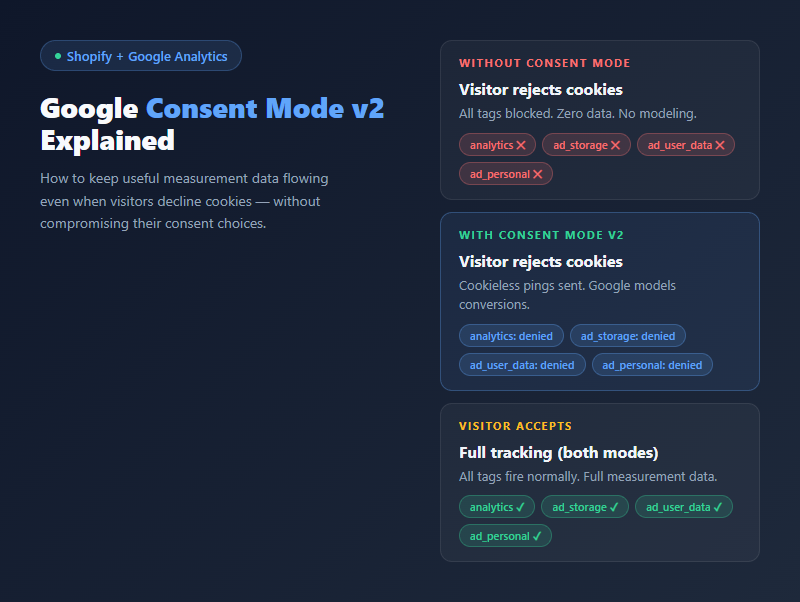
Google Consent Mode v2 is a consent-signal API that lets Google measurement tags respond to visitor consent choices instead of firing or blocking completely. When a visitor rejects cookies, Google still receives limited cookieless pings that fuel conversion modeling in Google Ads and Google Analytics 4.
Version 2 is required for anyone using Google advertising or measurement in the European Economic Area, United Kingdom, and Switzerland under the Digital Markets Act. Without it, Google Ads cannot use EEA-visitor data for personalization or remarketing, and reported conversions drop as consent-denied traffic goes uncounted.
The problem this solves
When a visitor rejects cookies on your Shopify store:
- Your Google Analytics tag never fires
- Google Ads never sees the conversion
- Your ad optimization gets starved of data
- Your reported traffic can drop significantly (the impact varies by traffic volume, consent rate, and advertising setup)
This is not a bug — it is consent working correctly. But it limits the data you can act on.
If you are running Google Ads targeting EU customers, you are likely paying for clicks but cannot see which ones convert. Your cost-per-acquisition looks inflated, your return on ad spend looks worse than reality, and Smart Bidding does not have enough signal to optimize. The problem compounds: incomplete data leads to less effective bid decisions, which leads to wasted ad spend.
What Google Consent Mode v2 does
Instead of “tag fires” or “tag does not fire,” Consent Mode v2 adds a third option:
| Consent state | What happens |
|---|---|
| Granted | Full tracking (cookies, personal data, everything) |
| Denied | Tag is blocked entirely — no data at all |
| Denied + Consent Mode v2 | No advertising or analytics cookies are stored. Google receives limited cookieless measurements under the denied consent state, and uses statistical modeling to estimate conversions. |
With Consent Mode v2, even when visitors reject cookies, Google still gets a signal. It uses conversion modeling to fill in the gaps.
What changed from v1 to v2
The original Consent Mode had two signals: analytics_storage and ad_storage. Version 2 added two more:
| Signal | Controls | Required in v2? |
|---|---|---|
analytics_storage |
Whether Google Analytics can store cookies | Yes |
ad_storage |
Whether Google Ads can store cookies | Yes |
ad_user_data |
Whether user data can be sent to Google for advertising | New in v2 |
ad_personalization |
Whether personalized ads can be shown | New in v2 |
If your consent setup only sends the original two signals, Google treats it as v1. A complete Consent Mode v2 setup sends all four signals. Modeling availability also depends on implementation quality, traffic volume, and Google’s eligibility thresholds.
How it works technically
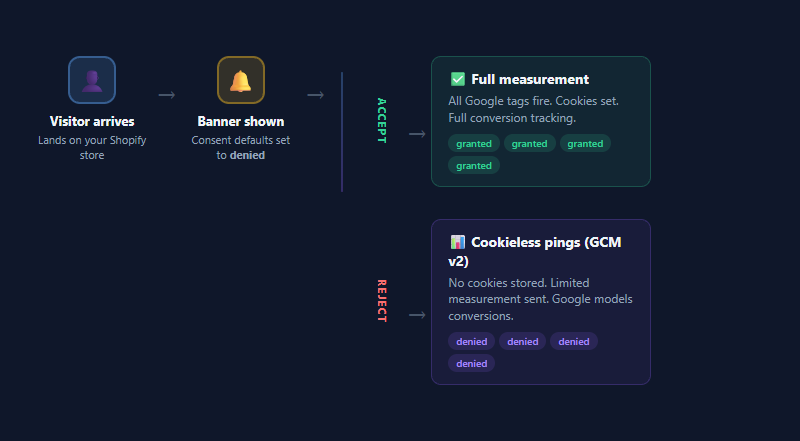
When consent is denied, Consent Mode v2 sends “consent-aware pings” to Google:
- No advertising or analytics cookies are stored
- No user-level identification
- Google receives limited cookieless measurements: page URL, timestamp, user agent, referrer, and ad-click indicators
Google then uses machine learning across its entire dataset to model what a conversion rate probably looks like for your traffic — even without individual-level data. Google calls this “conversion modeling” and it fills gaps in your reports with statistical estimates based on patterns from similar consented traffic.
Google includes eligible modeled conversions in the regular Conversions column. Check the Diagnostics tab in Google Ads to see whether Consent Mode is implemented and whether modeling is active.
Setting it up on Shopify: two paths
You can add Consent Mode v2 to your Shopify store two ways.
Manual vs app: which fits your setup?
| Aspect | Manual (GTM) | Consent app |
|---|---|---|
| Setup time | 3-6 hours | 5-10 minutes |
| Ongoing maintenance | Yes (test after each Shopify theme update) | Handled by the app |
| Custom GTM knowledge needed | Yes | No |
| Cost | Free (developer time) | Free to $50/month |
| Best for | Complex tracking stacks, multi-brand stores | Standard Shopify stores |
| Risk of misconfiguration | Higher (order of tag firing matters) | Lower (Shopify Privacy API integration) |
Option A: Manual setup with Google Tag Manager
- Set up a GTM container with consent-aware tags
- Configure consent defaults as
deniedfor all EU visitors - Connect your consent banner to GTM’s consent API
- When visitor accepts → update consent state → tags fire normally
- When visitor rejects → consent stays
denied, and compatible Google tags send cookieless pings - Make sure all four consent signals are included (
analytics_storage,ad_storage,ad_user_data,ad_personalization)
Consent defaults must be set before any measurement tag fires. In your GTM container, add a Consent Initialization trigger with this snippet or equivalent:
gtag('consent', 'default', {
  ad_storage: 'denied',
  ad_user_data: 'denied',
  ad_personalization: 'denied',
  analytics_storage: 'denied',
  wait_for_update: 500,
  region: ['DE', 'FR', 'IT', 'ES', 'BE', 'NL', 'AT', 'DK', 'FI', 'IE', 'PT', 'SE', 'GR', 'PL', 'LU', 'BG', 'CY', 'CZ', 'EE', 'HR', 'HU', 'LV', 'LT', 'MT', 'RO', 'SI', 'SK', 'GB', 'CH', 'IS', 'NO', 'LI']
});
After the visitor decides, the consent banner should call gtag('consent', 'update', ...) with granted for whichever signals apply.
This works but requires GTM knowledge and ongoing maintenance. You also need to keep the consent defaults in sync with your banner — if they get out of sync, incorrect ordering can cause data collection before the visitor chooses and may create privacy-compliance risk, or you could be losing data unnecessarily by blocking pings after consent.
Option B: Use a consent app with Consent Mode v2 built in
Several Shopify consent apps include Consent Mode v2 integration natively:
- Amrita Cookie Consent — free, Consent Mode v2 included on the free plan
- Pandectes GDPR Compliance ($9-49/month — Consent Mode v2 on paid plans)
- Consentmo ($9-29/month)
With these apps, the consent-to-Google signal mapping is handled for you:
- Install the app
- Enable the consent banner
- Banner sets consent defaults to
deniedvia Shopify’s Customer Privacy API - On accept → consent
updatewithgrantedfor all four signals - On reject → consent stays
denied, and compatible Google tags receive the denied state - Google receives the signal either way
Amrita sends all four Consent Mode v2 signals to compatible Google tags already installed on your store. Verify the setup with Google Tag Assistant after installation.
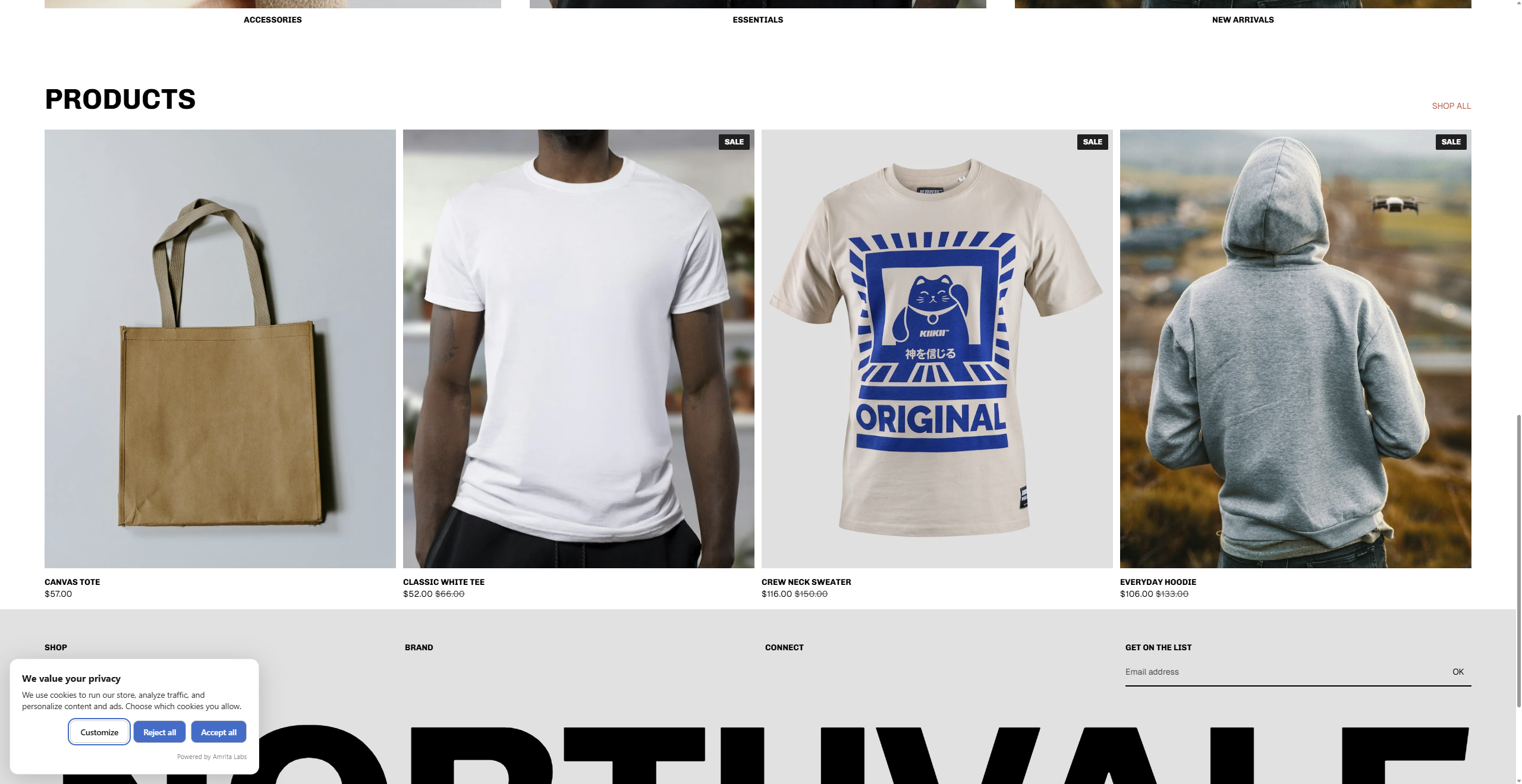
How does Amrita Cookie Consent handle Consent Mode v2?
Amrita Cookie Consent is a free Shopify app that adds a GDPR-compliant cookie banner with Consent Mode v2 built in on the free plan. Once installed on your store, the app:
- Sets consent defaults to
deniedbefore any measurement tag runs, using Shopify’s Customer Privacy API - Emits all four Consent Mode v2 signals (
ad_storage,analytics_storage,ad_user_data,ad_personalization) to compatible Google tags - Auto-detects visitor region and applies GDPR requirements to EEA, UK, and Swiss visitors
- Sends the granted or denied state on the visitor’s consent decision
- Requires no code changes to your Shopify theme
The app does not replace Google Analytics or Google Ads — it wires the consent signals into whatever Google measurement stack you already run. If you install Amrita Cookie Consent alongside GTM, it uses Shopify’s Consent Mode API, and GTM tags configured to respect consent will honor the choice automatically.
What about Meta Pixel and Facebook Ads?
Consent Mode v2 is a Google-specific protocol. Meta has its own approach: the Conversions API. If you are running Facebook or Instagram ads alongside Google Ads, you will need both:
- Google Ads: Consent Mode v2 handles the consent-denied case
- Meta Ads: Server-side Conversions API can send events without cookies, but you still need consent for personal data under GDPR
Most Shopify consent apps handle the Google side. For Meta, check whether your app also integrates with Meta’s Conversions API or if you need a separate setup.
Verifying it works
After setting up, check with Google Tag Assistant (Chrome extension):
- Visit your store in an incognito window
- Accept cookies → verify GA4 + Ads tags fire normally in Tag Assistant
- Close incognito, open a new one
- Reject cookies → verify you see
consent_defaultwithanalytics_storage: deniedAND that cookieless pings still fire - Check that all four consent signals appear in the Tag Assistant consent tab
- In Google Ads, check the Diagnostics tab to see whether Consent Mode is implemented and whether modeling is active
If the Diagnostics tab does not show Consent Mode as active after a week of traffic, double-check that your Google tag loads in consent-aware mode (not fully blocked on denial).
You can also verify in Google Analytics: go to Admin → Data Streams → your stream → Consent Settings. It should show “Consent Mode active” if everything is configured correctly.
Compliance context: DMA, GDPR, and EAA
- Digital Markets Act (DMA) — March 2024. Consent Mode v2 became the practical baseline for using Google Ads with EEA, UK, and Swiss visitor data. Google will not use denied-consent data for personalization or remarketing without it.
- General Data Protection Regulation (GDPR) — ongoing. Consent must be freely given, specific, informed, and unambiguous. Pre-ticked accept boxes and cookie walls that block content until consent is given are non-compliant in most jurisdictions.
- European Accessibility Act (EAA) — June 28, 2025. Requires consent banners to be operable by keyboard, readable at 200% zoom, and compatible with screen readers. Many older cookie banners fail these requirements.
None of these regulations mandate Consent Mode v2 by name. What they mandate is that visitor consent choices are respected and that measurement without consent does not track individuals. Consent Mode v2 is currently the most practical way to keep Google measurement working under those constraints.
Common mistakes
-
Blocking ALL scripts on rejection — if your consent solution kills every script when consent is denied, Consent Mode v2 pings cannot fire either. The Google tag needs to load in “consent-aware” mode, not be blocked entirely.
-
Not setting consent defaults — Consent defaults should be set before measurement tags run. If you do not explicitly set defaults to
deniedbefore the consent decision, Google assumes consent is granted and sets cookies immediately. Incorrect ordering can cause data collection before the visitor chooses and may create privacy-compliance risk. -
Using enhanced conversions as a replacement — Enhanced Conversions enhance an existing conversion event. If the base tag never fires (because consent was denied), there is nothing to enhance. Consent Mode v2 is the layer that handles the denial case.
-
Only sending two consent signals instead of four — If your setup only sends
analytics_storageandad_storage(the v1 signals), you do not have a complete v2 implementation. A complete Consent Mode v2 setup sends all four signals, including the newad_user_dataandad_personalization. -
Not testing in incognito — Your browser likely has existing cookies and consent state cached. Always test consent flows in incognito windows to simulate a first-time visitor experience.
FAQ
Does Consent Mode v2 replace the need for a cookie banner?
No. Consent Mode v2 works alongside your consent banner, not instead of it. You still need to ask for consent. Consent Mode v2 just makes sure Google gets useful (non-personal) data even when the answer is “no.”
Do I need Consent Mode v2 for non-EU stores?
Not required, but recommended. Consent Mode v2 only affects Google’s data handling in the EEA, UK, and Switzerland, where the Digital Markets Act applies. For US, Canada, or Asia-Pacific stores with no EEA traffic, Consent Mode v2 changes nothing. If your store gets any EU traffic at all — even a small percentage — enabling Consent Mode v2 is the safer default.
What if I already use another cookie app?
Check whether it sends all four Consent Mode v2 signals (analytics_storage, ad_storage, ad_user_data, ad_personalization) and whether it uses Shopify’s Customer Privacy API. If it does, you are set. If it only sends the v1 signals or only sets consent through GTM directly, you may need to reconfigure it or replace it. Older cookie apps built before March 2024 often did not update to v2.
Does this work with Google Analytics 4 and Universal Analytics?
Consent Mode v2 is fully supported by Google Analytics 4. Universal Analytics stopped processing new data in July 2023, so there is nothing to configure there. For GA4, once Consent Mode v2 is active, your measurement stream shows modeled traffic in the standard reports.
Will this affect my Google Ads billing?
No. Consent Mode v2 affects reporting and optimization, not billing. You still pay per click. But with better conversion data, Smart Bidding can optimize more effectively — which should improve your return on ad spend over time.
How long until I see modeled conversions?
Google needs enough consented traffic to build a model. Modeling availability depends on implementation quality, traffic volume, and Google’s eligibility thresholds. Smaller stores may not qualify for modeling.
How do I verify Consent Mode is working after setup?
Use Google Tag Assistant in an incognito window. Reject cookies on your store, then check whether consent signals show denied for the four v2 signals AND whether cookieless pings still fire. In Google Ads Diagnostics, look for the “Consent Mode implemented” indicator after a few days of traffic.
Ship this on your Shopify store this afternoon
Manual setup with GTM is fine if you already run a custom tag stack and know GTM well. For every other Shopify store, an app with Consent Mode v2 built in is faster to set up, easier to keep in sync with Shopify theme updates, and less likely to break silently.
- Install Amrita Cookie Consent — free forever, Consent Mode v2 on the free plan, no third-party scripts, no visitor cap
- Read more about Amrita Cookie Consent — features, pricing, and how it integrates with Shopify’s Customer Privacy API
Questions? Reach out at hello@amrita-labs.com.