 Chrome Extension
Stream the gameplay,
not your private Discord.
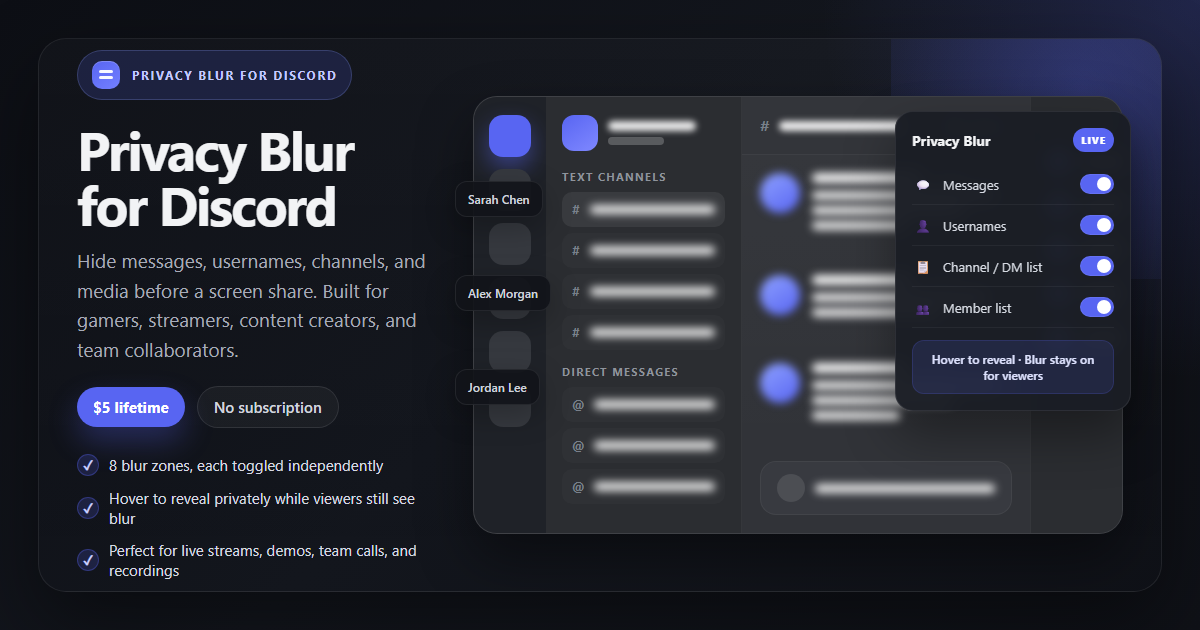
Privacy Blur for Discord helps gamers, streamers, content creators, and team collaborators hide DMs, usernames, channels, and media before they share a screen, record a tutorial, or jump into a live call.
Free install · Pro is $5 lifetime · One-time payment, no subscription
How it works
Open Discord in Chrome
Go to discord.com. The floating Privacy Blur widget appears automatically so you can prep before a stream, team demo, or recording.
Pick the zones you want hidden
Toggle messages, usernames, channel lists, avatars, media, and more before you share your screen with viewers, teammates, or clients.
Hover to reveal privately
Need to check a message yourself? Hover over blurred content locally while your audience still sees the blur during the live share.
8 Independent Blur Zones
Messages
Blur message text inside active chats, threads, and replies.
Usernames
Hide sender names in busy DMs, servers, and voice chat sidebars.
Channel / DM List
Blur your left sidebar so server names, channels, and DMs stay private.
Activity Status
Hide status text, activity details, and presence hints that reveal what you are doing.
Avatars
Blur profile photos in chat, member lists, and popovers before you go live.
Compose
Hide drafts and half-written replies so unfinished thoughts do not leak on stream.
Images & Videos
Blur media previews, embeds, screenshots, and shared clips inside Discord chats.
Member List
Hide who is in the room when you share internal servers, private communities, or client channels.
Pro Features
- ✓ Persist blur settings across reloads so every stream starts protected
- ✓ Alt+Shift+B global toggle plus Alt+Shift+1 through 8 per-zone shortcuts
- ✓ Custom keyword rules for terms like “salary”, “offer”, “spoiler”, or “confidential”
- ✓ Sender rules to auto-blur specific people during coaching, mod work, or team reviews
- ✓ One payment, lifetime access — $5 once, never a monthly subscription
- ✓ Priority support at hello@amrita-labs.com
Install free · Upgrade any time · $5 lifetime
Frequently asked questions
How much does Privacy Blur for Discord cost?
Does it send Discord messages to a server?
Who is this built for?
Can I blur the channel list and member list before I start sharing?
Does it work in the Discord desktop app?
discord.com. The desktop app does not support Chrome extensions.Share Discord with confidence.
Blur fast. Stream calmly. Keep private servers and DMs private.
View on Chrome Web Store